> ## Documentation Index
> Fetch the complete documentation index at: https://docs.teamate.app/llms.txt
> Use this file to discover all available pages before exploring further.
# Insights
> A personalized insight inbox generated from your workspace activity
## Overview
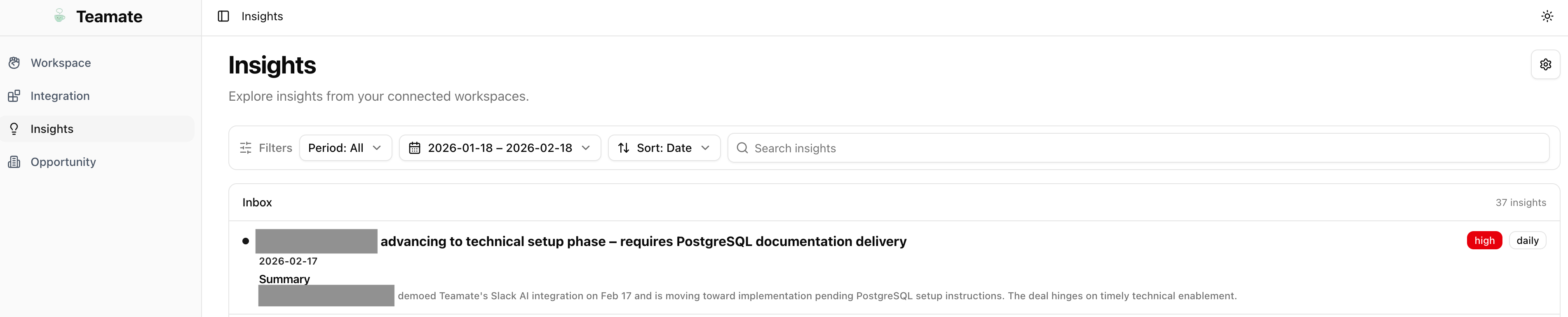
The **Insights** dashboard gives you a curated inbox of AI-generated insights derived from your Slack conversations, meetings, and connected tools. Teamate continuously monitors your workspace activity and surfaces patterns, risks, and opportunities that might otherwise be missed.
Go to [my.teamate.app/insights](https://my.teamate.app/insights) to view your insight inbox.
 ***
## Insight inbox
Each insight card shows:
* **Title** — A short headline for the insight
* **Category** — The type of insight (e.g., Patterns, Risks, Opportunities, Action Items)
* **Time period** — When the insight was generated (Daily, Weekly, Monthly)
* **Source indicators** — Which channels and meetings the insight was drawn from
* **Summary** — A short explanation with supporting context
Click any insight card to expand and see the full detail, linked sources, and suggested next steps.
***
## Insight settings
Click **Settings** (⚙️) in the top-right of the Insights page to configure how insights are generated.
***
## Insight inbox
Each insight card shows:
* **Title** — A short headline for the insight
* **Category** — The type of insight (e.g., Patterns, Risks, Opportunities, Action Items)
* **Time period** — When the insight was generated (Daily, Weekly, Monthly)
* **Source indicators** — Which channels and meetings the insight was drawn from
* **Summary** — A short explanation with supporting context
Click any insight card to expand and see the full detail, linked sources, and suggested next steps.
***
## Insight settings
Click **Settings** (⚙️) in the top-right of the Insights page to configure how insights are generated.
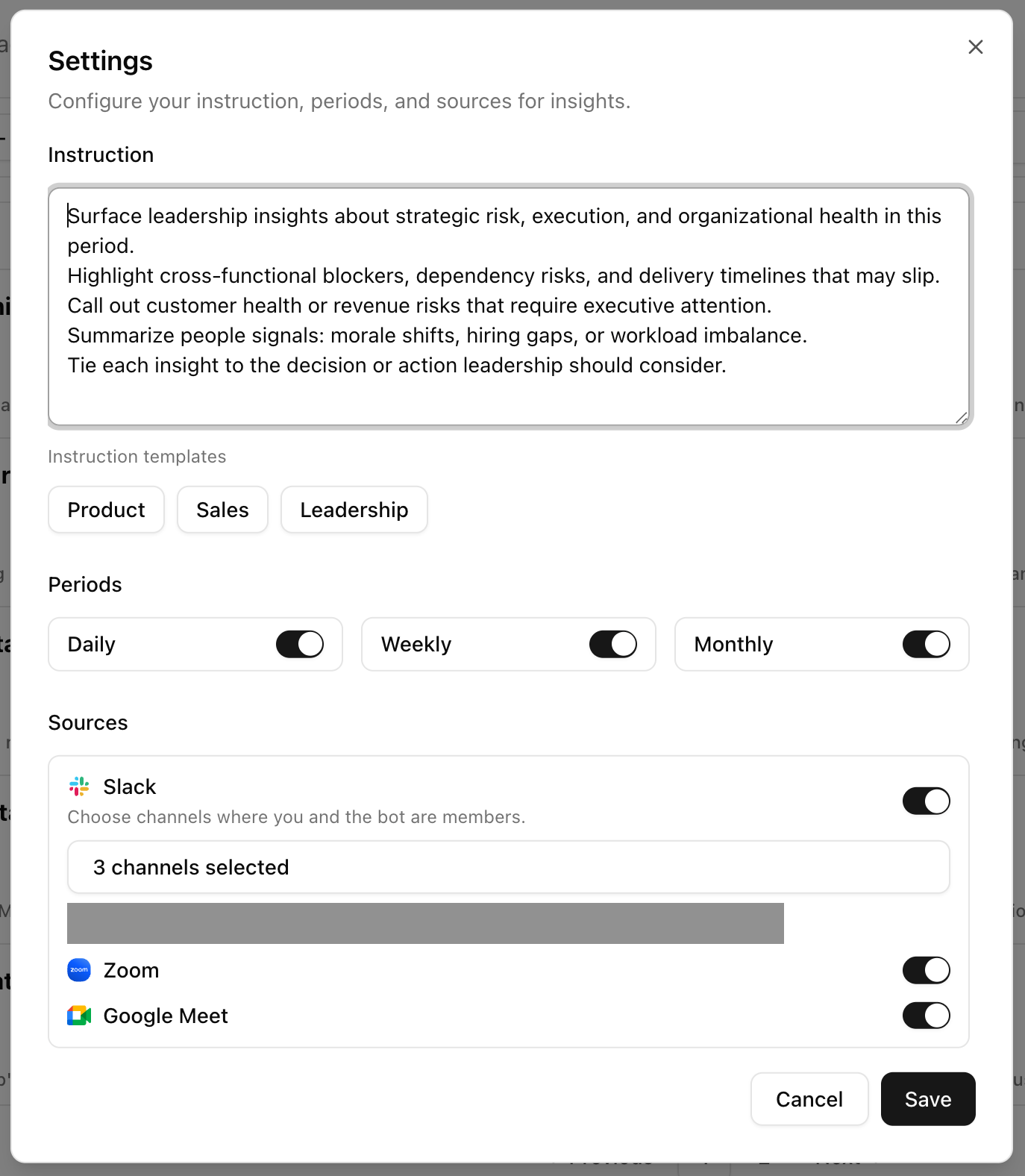 You can configure:
* **Channels** — Select which Slack channels to monitor for insight generation
* **Insight types** — Enable or disable categories (Patterns, Risks, Opportunities, Action Items)
* **Frequency** — Choose daily, weekly, or monthly digest cadence
Click **Save** when done. Teamate will begin generating insights based on your updated configuration.
***
## How insights are generated
Teamate uses a background analysis loop that runs on your selected channels and connected meeting summaries. It extracts signals, groups them by theme, and generates insight cards.
Insights are **personal by default** — each user's insight inbox reflects the channels they've subscribed to and their own meeting memory. Admins can optionally configure workspace-wide channel subscriptions.
You can configure:
* **Channels** — Select which Slack channels to monitor for insight generation
* **Insight types** — Enable or disable categories (Patterns, Risks, Opportunities, Action Items)
* **Frequency** — Choose daily, weekly, or monthly digest cadence
Click **Save** when done. Teamate will begin generating insights based on your updated configuration.
***
## How insights are generated
Teamate uses a background analysis loop that runs on your selected channels and connected meeting summaries. It extracts signals, groups them by theme, and generates insight cards.
Insights are **personal by default** — each user's insight inbox reflects the channels they've subscribed to and their own meeting memory. Admins can optionally configure workspace-wide channel subscriptions.